CampFlow: from spreadsheets to a connected operation
A functional prototype connecting campground management, reception and field work — from reservation to lot release.
Role
Product Designer · UX/UI
Scope
Strategy · Journeys · Prototype · UI
Industry
Hospitality · B2B SaaS
Platforms
Web · Desktop · Mobile
Explore the experience
Five individual views of the functional prototype and interface concepts. These screens illustrate the proposed experience, not measured operational results.
1 / 5
Long screens scroll vertically inside the image.
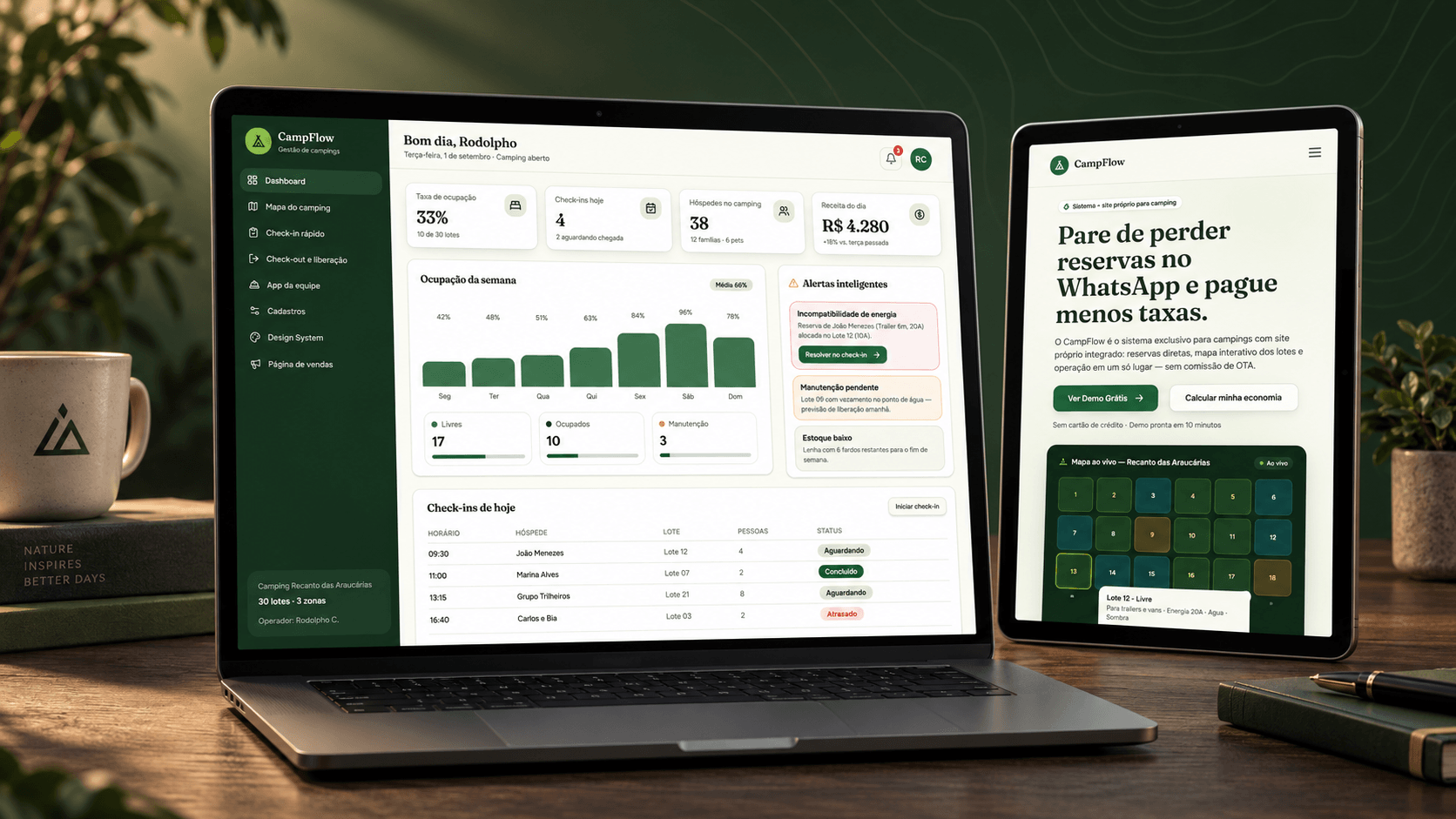
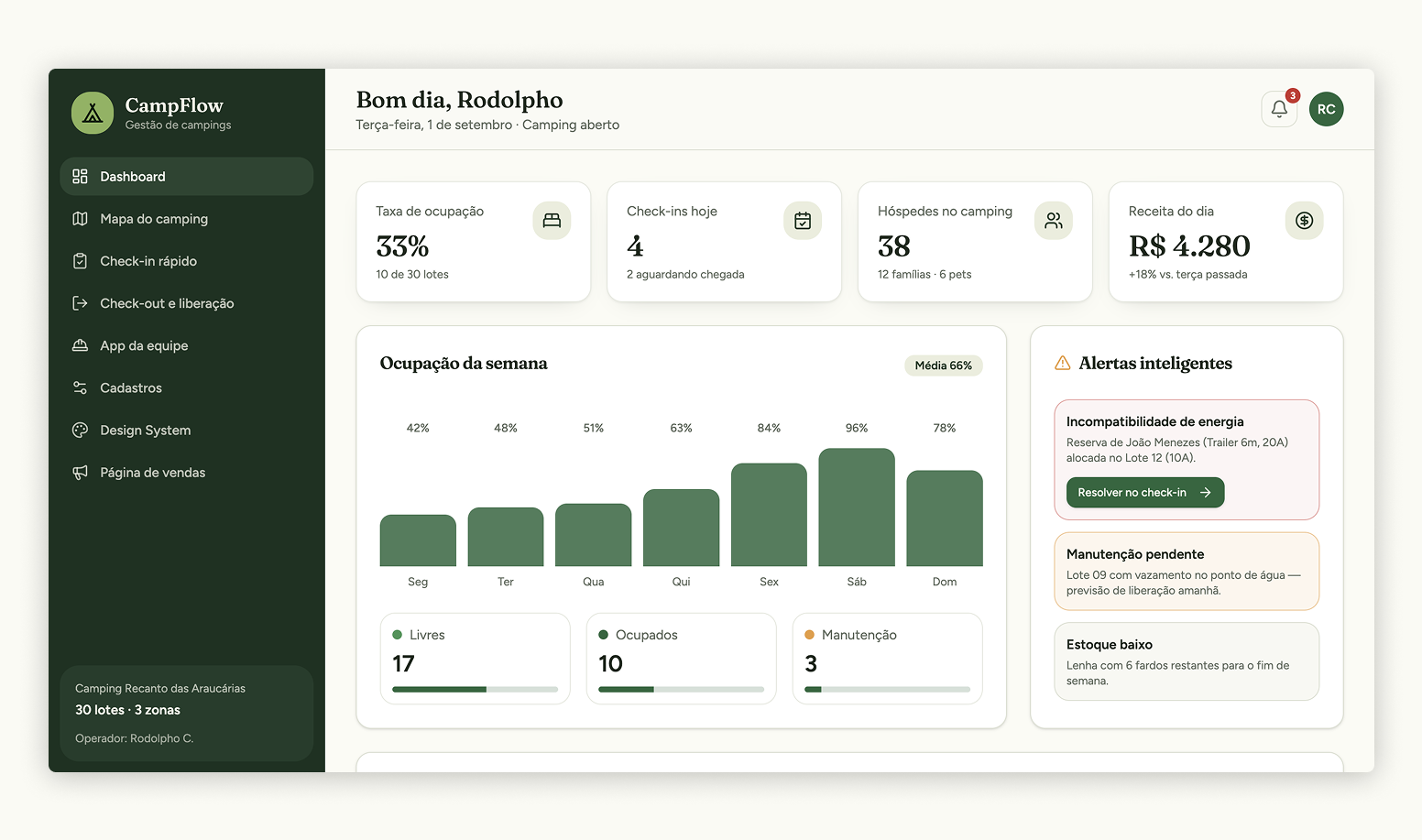
Operational overview
Occupancy, arrivals and alerts in one management view.
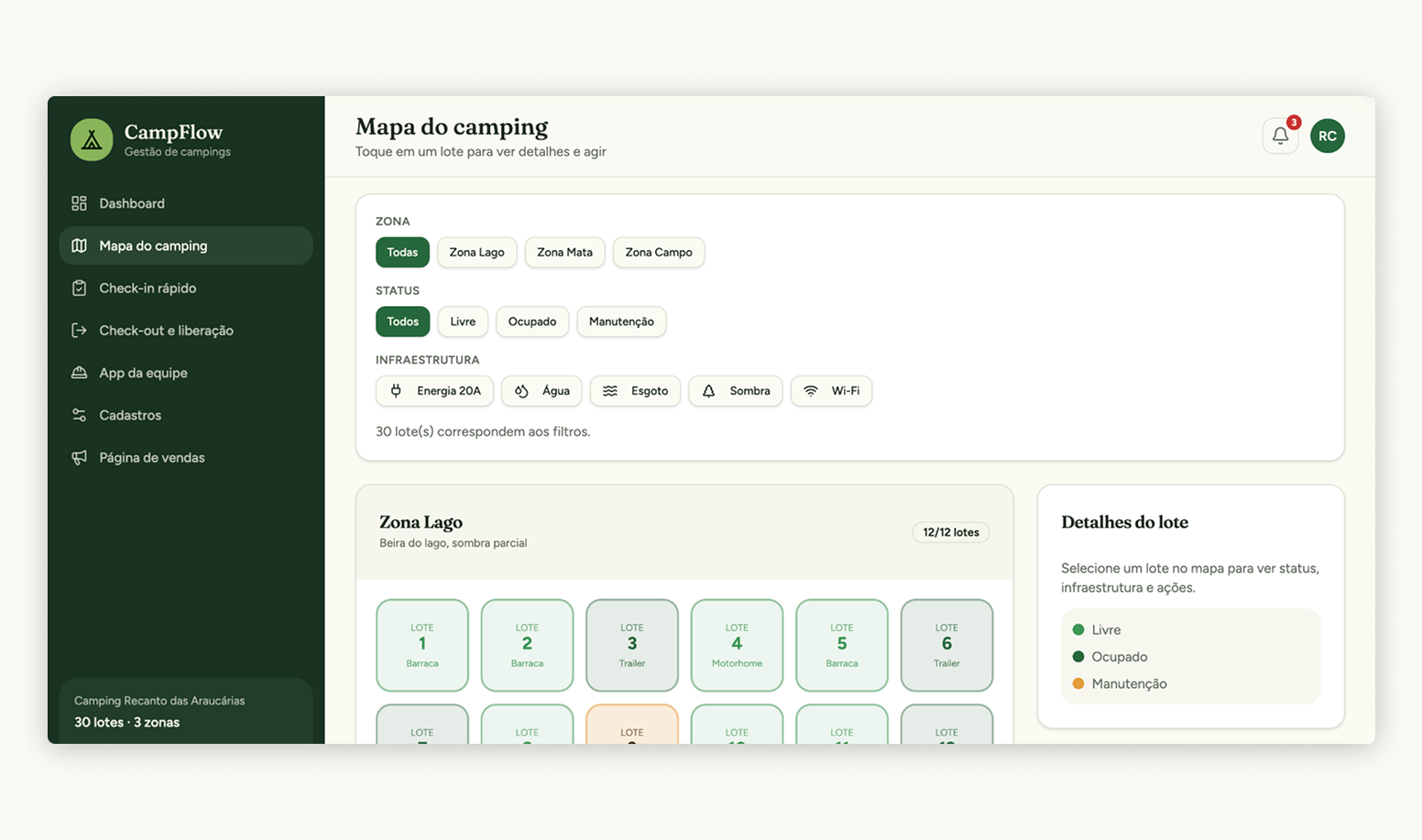
Lot map
Spatial context for availability and lot allocation.
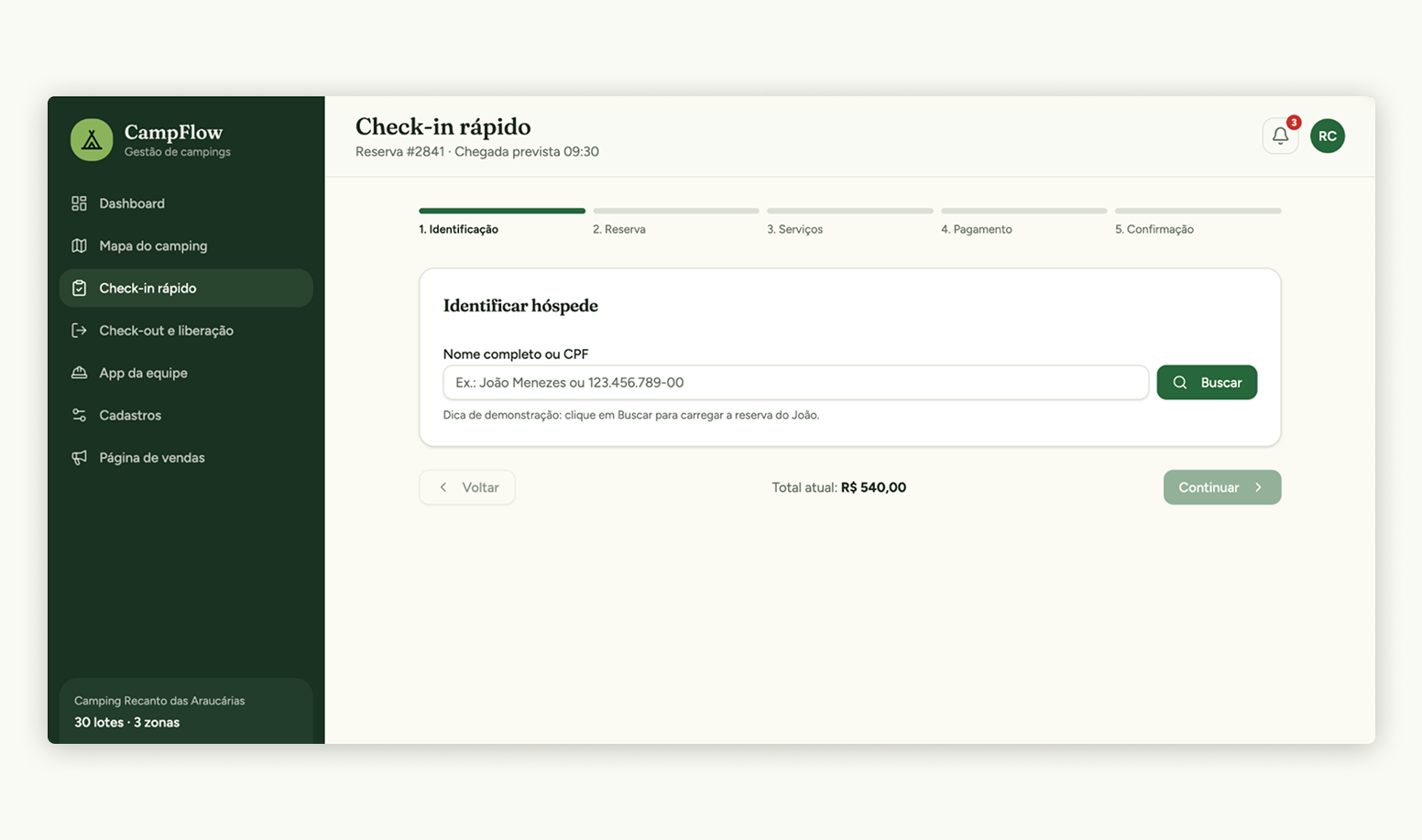
Guided check-in
A progressive flow with the total visible throughout the task.
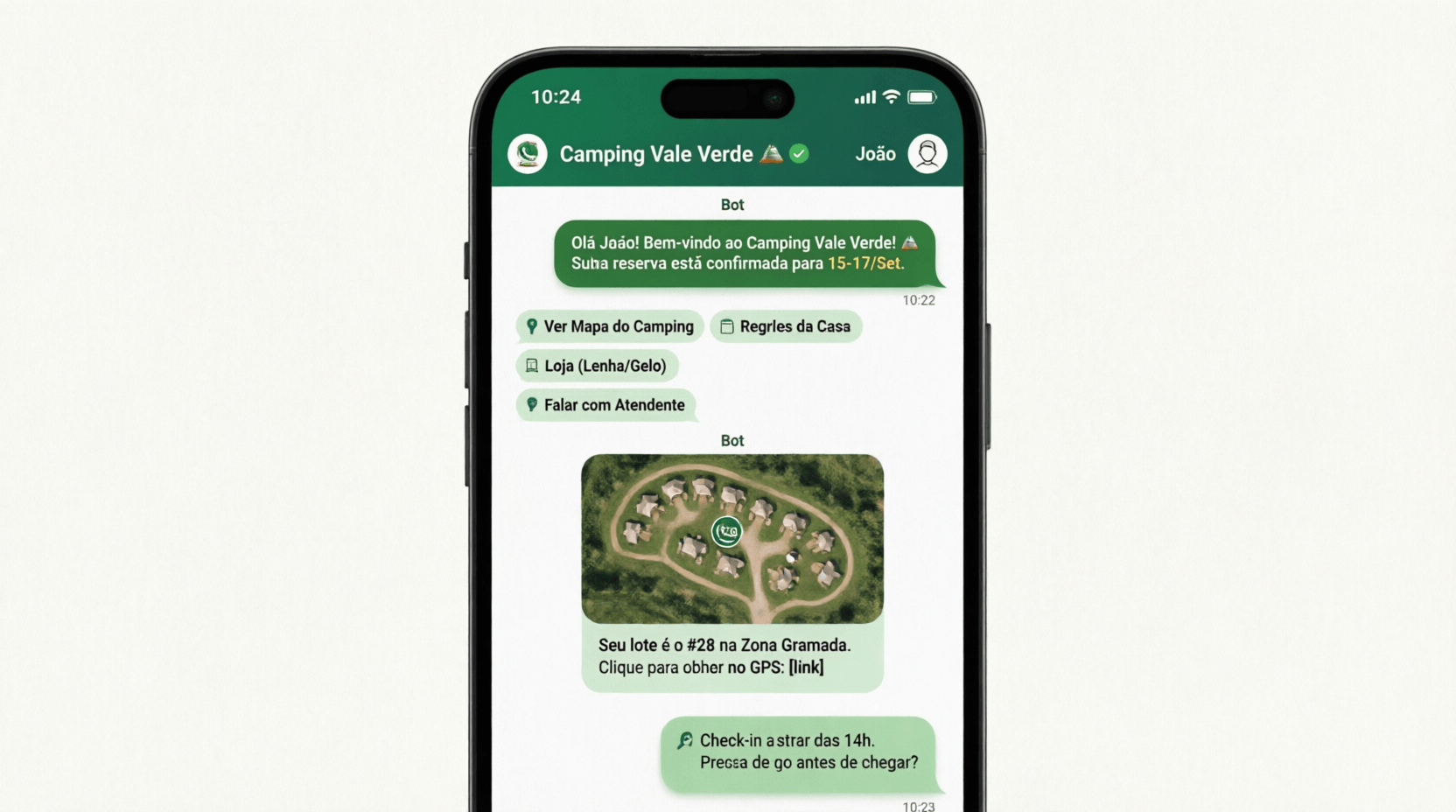
Guest support concept
Reservation context and service shortcuts in a conversational interface.
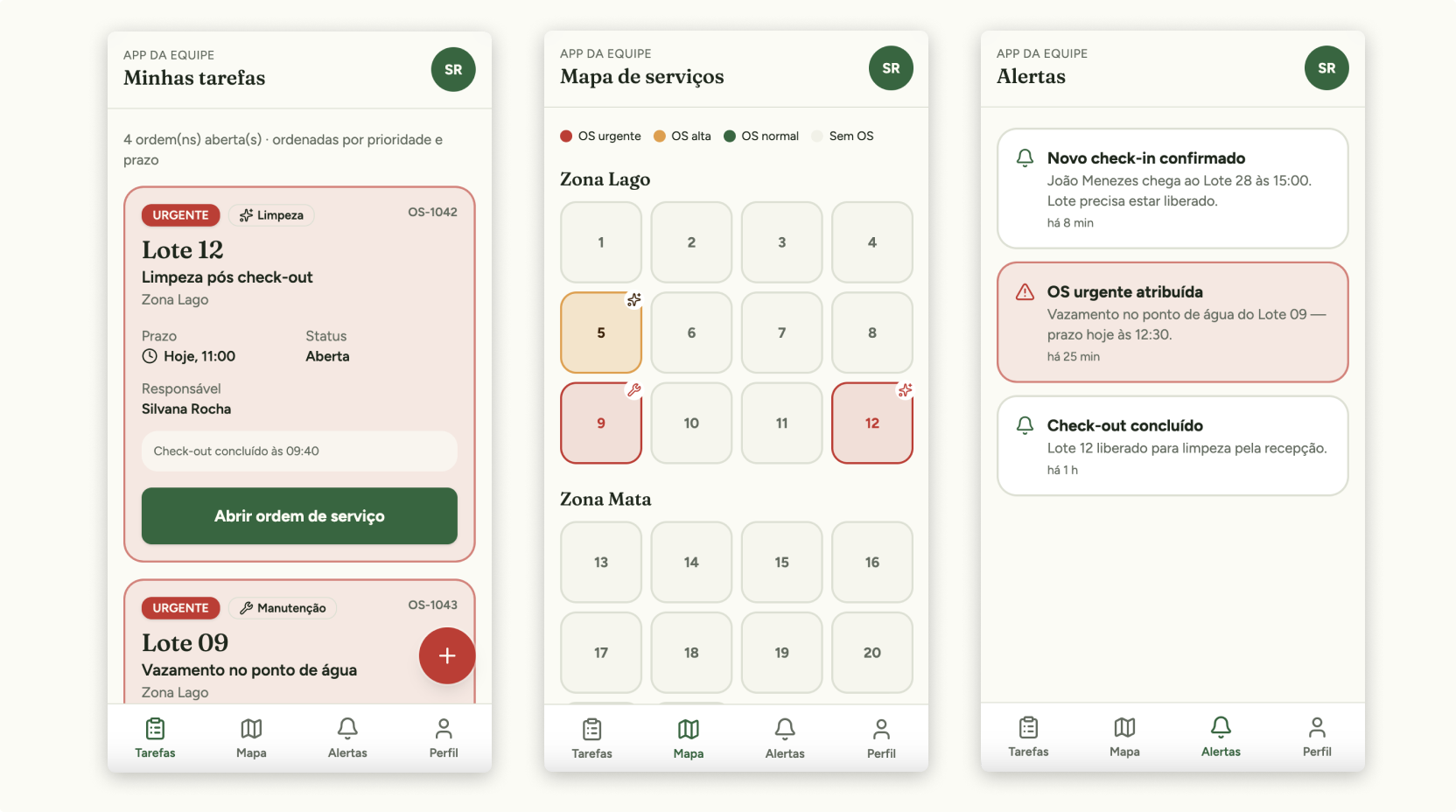
Field team concept
Tasks and operational alerts for the staff experience.
CampFlow explores how campground teams can keep reservations, lot conditions and service tasks connected across reception and field work. The starting problem hypothesis is that information split between messages, spreadsheets and informal handoffs makes operational exceptions harder to identify and resolve.
I independently shaped the product scope, journeys, UX/UI and functional prototype, using AI to explore scenarios and accelerate implementation. The current evidence is the prototype and its documented flows; this case does not report measured operational gains.
02
The Problem
The design problem was to preserve the context of a reservation as it moves between people and channels. A 20A motorhome assigned to a 10A lot, a pending maintenance task or an unconfirmed payment needs a visible consequence and a clear next action. These scenarios guided the design; their frequency and business impact still need validation with campground teams.
How do we give the manager control of the whole without adding bureaucracy to whoever is at the front desk or in the field?
03
People
Four perspectives guided the product. Each needed an interface and a level of information compatible with their context.
Manager
Wants to see occupancy, cash flow and bottlenecks to decide quickly.
Reception
Needs to locate reservations, accommodate walk-ins and complete check-ins without queues.
Field team
Executes cleaning and maintenance on the phone, often under sun or rain.
Camper
Expects to book, pay and find their way autonomously before and during the stay.
04
Key Journey
I organized the journey from discovery and booking to arrival, stay and lot release. The decision was to treat these as one lifecycle with shared reservation context. The trade-off is a broader product scope: each handoff needs clear ownership and exception states rather than another isolated screen.
01
Discover
Get to know the campground and compare options.
02
Book
Choose a lot, pay and receive confirmation.
03
Arrive
Identify the reservation and check in.
04
Stay
Consume services and receive support.
05
Release
Check out, inspect and prepare the lot.
05
From Strategy to Interface
a.A scalable system from the first pixel
I established reusable tokens and component rules for the prototype, combining deep greens and sand tones with Fraunces headings. Operational states pair color with a label and dot. Visible focus and generous touch targets guide the design; a complete accessibility audit across the implemented product remains a separate validation task.
Semantic Palette & States
Primary#26673C
Success#3B9555
Warning#E69C3A
Urgent#C9302D
Sidebar#193220
Status Components (Color + Label + Dot)
FreeOccupiedAwaitingMaintenanceUrgent
b.A control tower for the manager
The dashboard puts occupancy, arrivals, revenue and exceptions in one overview, with actions attached to alerts. I prioritized signals that can lead to a decision rather than giving every metric equal weight. Testing should establish whether managers can identify the most urgent issue without scanning the whole workspace.
The daily agenda turns indicators into next steps.
c.Daily operations at a glance
The arrivals list connects each reservation to its lot and current status. Keeping the overview separate from the guided check-in supports two tasks: scanning the day's arrivals and completing one guest's process. Whether this separation reduces errors or waiting time remains to be tested.
d.The campground as it really is
The visual map represents zones, infrastructure and lot status, so compatibility can be considered alongside availability. This adds spatial context but also requires status and filter rules to stay consistent with the list and check-in flow.
e.Guided check-in, no improvisation
The five-step flow moves from guest identification through reservation, services, payment and confirmation. The key decision was to expose compatibility exceptions before confirmation while keeping the total visible. A guided sequence adds steps, so validation should check whether the added structure helps staff handle exceptions without slowing routine arrivals.
A progressive process keeps focus and makes the total always visible.
f.The experience starts before arrival
The conversational concept places confirmations, maps and guest support in WhatsApp rather than requiring another app. It illustrates continuity before arrival; the screen alone does not demonstrate a deployed messaging integration or its reliability.
Meeting the user where they already are.
g.The operation in the team's pocket
The staff-app concept turns service requests into a queue with zone, responsibility and status. The design goal is to keep reception and field teams working from the same operational context. Outdoor readability, connectivity constraints and the timing of alerts need validation in actual field conditions.
Staff-app concept with prioritized tasks and operational alerts.
06
From fragmented operation to connected system
A reconstructed example of fragmented channels contrasted with the proposed shared operational state. This comparison illustrates the design hypothesis; it is not a measured before-and-after result.
Before: fragmented channels
WhatsAppReservations and requests
SpreadsheetOccupancy and payments
Paper notesMaintenance and handoffs
Duplicate information · invisible tasks · no shared status
→Design decision: one shared operational state
After: connected operation
The “before” is a reconstructed workflow, not a historical screenshot.
07
Try one product decision
Complete a simplified check-in and see the operation update. Fictional data; interaction derived from the functional prototype.
CampFlow · Live fragment
Guided check-in
AI-assisted prototype
Available lots18
Occupied24
Today's arrivals6
123
1 · Select an arrival2 · Assign a compatible lot
A-12 matches vehicle size and electrical requirements.
3 · Confirm check-in
GuestMarina Costa
LotA-12
Stay3 nights
✓
Check-in completed
Lot A-12 is now occupied. The dashboard and field team received the same status.
The following examples connect the design decisions to their supporting exploration. Original prompts are available on demand.
Discovery · Market and scopePROMPT 01
Design decision informed
The analysis filtered out generic hotel pain points and focused the product on campground-specific operational risks: lot compatibility, distributed field work, occupancy and maintenance.
View prompt
Act as a market research specialist for alternative hospitality in Brazil...
Flow design · Exceptions and human decisionsPROMPT 02
Design decision informed
Each critical exception was split into a system response and a human decision. This shaped the guided check-in, compatibility checks, maintenance alerts and shared operational status.
View prompt
Design the detailed front-desk check-in and field-team operation flow for CampFlow. Do not create an idealized happy path...
AI expanded the scenario space and made exceptions visible early. Prioritizing which risks deserved product behavior — and where human judgment must remain — was a design decision.
↳
AI support
AI supported scenario exploration and functional prototyping. I defined the campground-specific scope, prioritized operational exceptions and decided where human judgment was necessary.
The result so far is a functional prototype connecting management, reception and field-work scenarios, supported by a shared design system. It makes the proposed operating model tangible. Reduced queues, fewer allocation conflicts and better coordination remain impact hypotheses, not measured outcomes.
01
Unified view of occupancy, revenue and operation
02
Less conflict between reservation and lot capacity
03
Guided check-in prepared for additional sales
04
Continuity between reception and field team
Results presented as impact hypotheses of the prototype; metrics should be validated in a pilot.
Can the team resolve an exception and preserve context?
Proposed pilot tasks: locate a reservation, detect the 20A/10A mismatch, choose a compatible lot, complete payment and confirmation, then hand a service request to the field team. Observe completion, time, errors, requests for help and how participants explain the current status. These are planned checks, not completed usability findings.
09
Learnings
The design work made one dependency explicit: a shared operational state is useful only when each role understands who acts next and why. The map, guided check-in and task queue express different views of that same context. The next learning cycle should test those handoffs with real teams before expanding the scope.